

Quick Start
- Click Profile -> Settings -> Connections
- Choose a service and click Connect
- Authorize access or enter the required credentials
- Mention the app with
@when asking Doe to use it
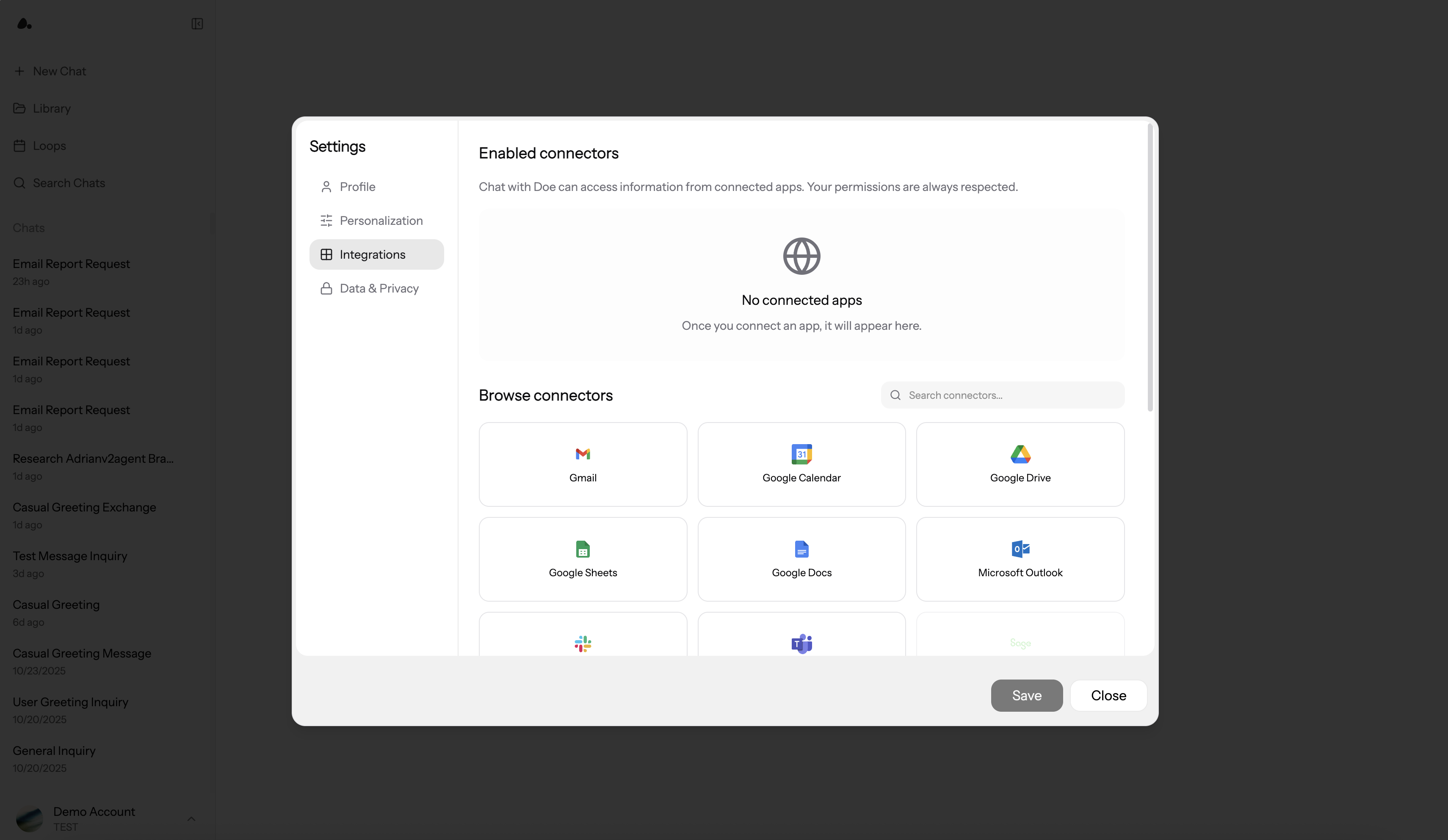
Available Integrations
Doe supports 75+ production-ready integrations across productivity, communication, CRM, advertising, analytics, finance, databases, support, projects, design, and monitoring.
Many core integrations, including the Google apps, Slack, Notion, Meta Ads, LinkedIn, X Ads, and Ramp, run on Doe’s own native connections, with automatic token refresh so connections stay healthy without manual reconnects.
The exact actions available vary by integration and granted scope. If a service is connected with view-only access, Doe will not be able to write or send through it. Some integrations are read-only by design: for example, Ramp and Rho expose read and reporting access, not money movement.
Delegation Patterns
For unfamiliar services or complex work, Doe can review what is available, confirm required permissions, and identify likely blockers before taking action.
Review Before External Actions
Doe can prepare work in connected apps without immediately sending or creating it. This is useful when the action affects customers, teammates, calendars, or external systems.
Email and calendar drafts render as editable cards in the conversation: adjust any field directly, then click Send or Create yourself. Nothing goes out until you do.
Use direct constraints when needed:
Slack Channel Tasks
When Slack is enabled for your workspace, you can use Doe from Slack as well as from the web app. Slack is one of several channels; you can also message Doe by email or text. See Channels. Common patterns:- Mention Doe in a channel to start work from that conversation.
- DM Doe for private follow-up work.
- Reply in the same Slack thread to continue existing agent work with context.
- Attach files in Slack and use them as request context.
- Forward a message to Doe: it reads the original text, author, and channel, not just the forward.
- Ask Doe to draft team updates, summarize customer threads, or prepare recurring reports.
Ways to Connect
- OAuth (One-Click)
- API Key
- Database
- Stripe (Dual Auth)
Most services use OAuth. This opens the service’s authorization page and returns a connected account to Doe.
What You’ll Need
- Admin/owner access to the service
- Popups enabled for
doe.so
Connection Steps
1. Start the connection- Settings -> Connections
- Click Connect on your desired service
- Authorization popup opens
- Log in to the service (if not already)
- Review requested permissions
- Click Authorize or Allow
- Popup closes automatically
- Service shows an active status
- Start asking questions immediately
Some services ask for one extra detail during authorization. Google Ads requires your Customer ID, and Rho connects through a secure bank-link flow instead of a standard OAuth page.
Managing Connections
Open Settings -> Connections to review connections.
From the enabled connector list, you can reconnect failed services, disconnect services, and manage org-wide access when you have admin permission.
Org-Wide Access and Multiple Accounts
Admins can make supported connections available across the organization, so a service is connected once and shared with the whole workspace. This is useful for shared systems such as Slack, CRM, analytics, and databases, and is available on enterprise plans. Some services support multiple accounts, such as Gmail, Microsoft Outlook, and PostgreSQL database connections, on supported plans. Use multiple accounts when a task needs access to more than one inbox or database.Using Integrations in Chat
Mention integrations explicitly when app choice matters:Security
Credentials are encrypted before storage and scoped to the organization connection. OAuth passwords are handled by the connected service, not Doe. Disconnecting a service removes Doe’s access path for that connection. For detailed security information, see Security & Privacy.Next Steps
Prompting
Get better results from connected apps
Research and Code Sandboxes
Combine integrations with research, data analysis, and generated files
Sharing
Share drafts, files, folders, and finished work
Team
Manage roles and permissions
Security
How we protect your data