> ## Documentation Index
> Fetch the complete documentation index at: https://docs.doe.so/llms.txt
> Use this file to discover all available pages before exploring further.
# Integrations
> Connect the apps and data sources your agents work across
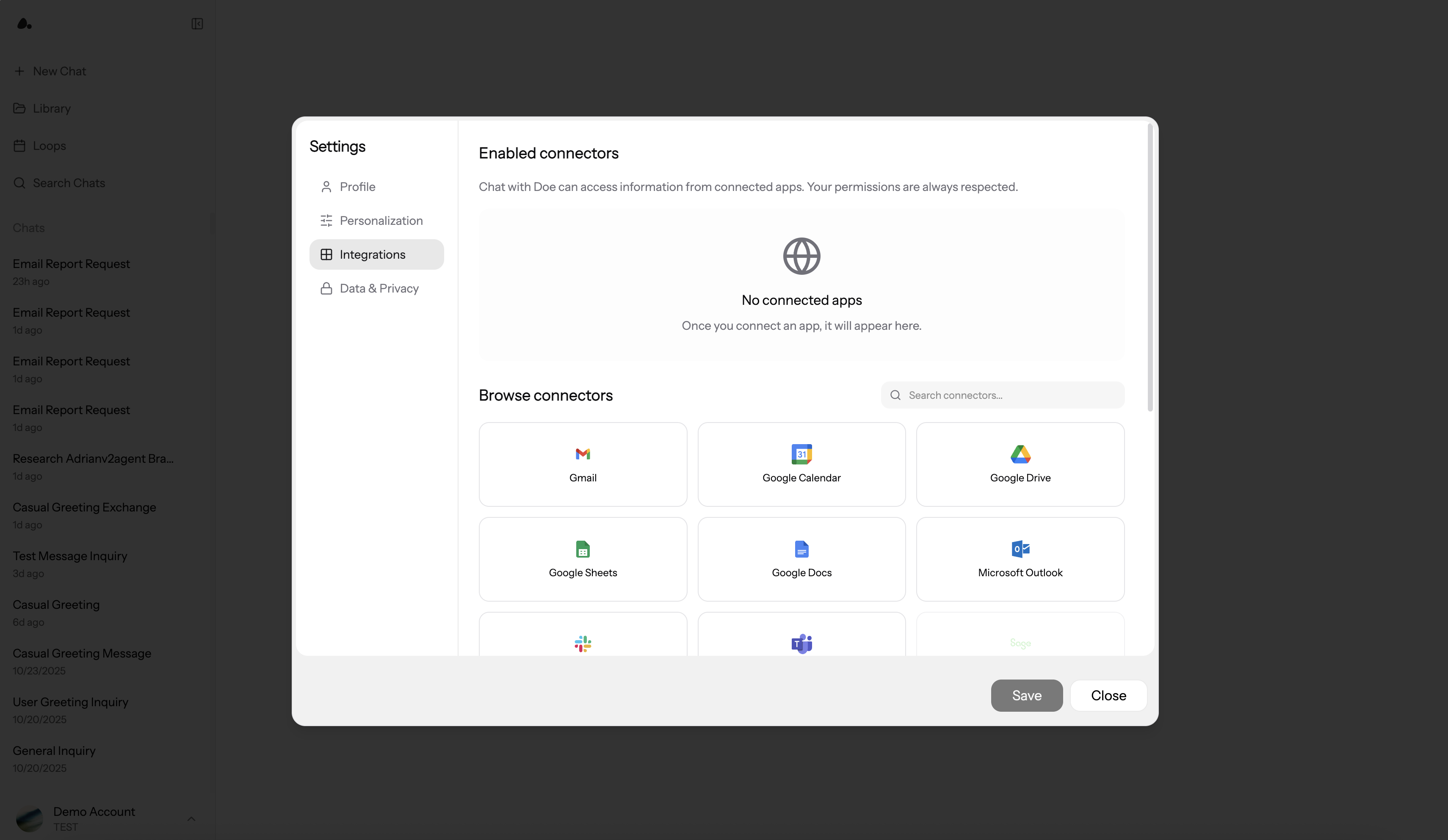
Integrations are the work surfaces for your agents. They let Doe search, read, create, update, draft, send, sync, and automate across the apps your team already uses. Availability depends on the service, your permissions, and the scopes granted during connection.
## Quick Start
1. Click **Profile** -> **Settings** -> **Connections**
2. Choose a service and click **Connect**
3. Authorize access or enter the required credentials
4. Mention the app with `@` when asking Doe to use it
 ***
## Available Integrations
Doe supports 75+ production-ready integrations across productivity, communication, CRM, advertising, analytics, finance, databases, support, projects, design, and monitoring.
| Category | Integrations |
| -------------------------- | ------------------------------------------------------------------------------------------------------------------------------------------------------------------------------------------------------ |
| Productivity and docs | Gmail, Google Calendar, Google Drive, Google Sheets, Google Docs, Microsoft Outlook, Notion, Confluence, Dropbox, OneDrive, DocuSign, Calendly, Zoom, Granola, Fireflies, Jotform, SurveyMonkey, Tally |
| Communication and outreach | Slack, Microsoft Teams, Telegram, X/Twitter, Reddit, Kit, Lemlist, Resend, Retell AI, SendGrid, Klaviyo, Mailchimp, Instantly, HeyReach |
| CRM and sales | HubSpot, Salesforce, Attio, Zoho, Apollo, Affinity, Ashby |
| Advertising | Meta Ads, Google Ads, LinkedIn Ads and Pages, X Ads, Adjust |
| Analytics and SEO | PostHog, Amplitude, Google Analytics, Google Search Console, Ahrefs, Semrush, Crustdata, HypeAuditor, Adyntel |
| Finance and commerce | Ramp, Rho, Stripe, Brex, Shopify, QuickBooks, Square |
| Databases | Neon, Supabase, PlanetScale, PostgreSQL |
| Monitoring | Datadog, New Relic, PagerDuty |
| Projects and support | Linear, Jira, Asana, Basecamp, GitHub, Intercom, Freshdesk |
| Design | Figma |
Many core integrations, including the Google apps, Slack, Notion, Meta Ads, LinkedIn, X Ads, and Ramp, run on Doe's own native connections, with automatic token refresh so connections stay healthy without manual reconnects.
The exact actions available vary by integration and granted scope. If a service is connected with view-only access, Doe will not be able to write or send through it. Some integrations are read-only by design: for example, Ramp and Rho expose read and reporting access, not money movement.
***
## Delegation Patterns
| Task | Example |
| -------------------- | ----------------------------------------------------------------------------------------------- |
| Search and summarize | `@Gmail Find customer replies about billing from the last 48 hours and summarize the threads.` |
| Cross-app analysis | `Use @HubSpot and @Gmail to identify stalled enterprise deals and draft next steps.` |
| Message drafting | `Draft a Slack update for the launch channel based on this spreadsheet.` |
| Calendar work | `Create a calendar hold for every approved interview slot.` |
| Data and analytics | `Use connected analytics to find activation drop-offs, then chart the funnel.` |
| Database analysis | `Use a connected database to analyze revenue by month, validate totals, and create a workbook.` |
| Recurring task | `Every Monday, check @HubSpot and @Gmail and send me pipeline risks.` |
For unfamiliar services or complex work, Doe can review what is available, confirm required permissions, and identify likely blockers before taking action.
## Review Before External Actions
Doe can prepare work in connected apps without immediately sending or creating it. This is useful when the action affects customers, teammates, calendars, or external systems.
| Draft | What you can review |
| -------------- | ------------------------------------------------------------------------------- |
| Email | Recipients, CC/BCC, subject, body, tone, source thread, and final send decision |
| Calendar event | Title, date, time, attendees, location, description, and final create decision |
| Team message | Channel, audience, message body, source context, and posting decision |
Email and calendar drafts render as editable cards in the conversation: adjust any field directly, then click **Send** or **Create** yourself. Nothing goes out until you do.
Use direct constraints when needed:
```text theme={null}
Draft the customer replies only. Do not send until I approve each one.
```
```text theme={null}
Create calendar drafts for these interview slots, but ask before creating events.
```
## Slack Channel Tasks
When Slack is enabled for your workspace, you can use Doe from Slack as well as from the web app. Slack is one of several channels; you can also message Doe by email or text. See [Channels](/essentials/channels).
Common patterns:
* Mention Doe in a channel to start work from that conversation.
* DM Doe for private follow-up work.
* Reply in the same Slack thread to continue existing agent work with context.
* Attach files in Slack and use them as request context.
* Forward a message to Doe: it reads the original text, author, and channel, not just the forward.
* Ask Doe to draft team updates, summarize customer threads, or prepare recurring reports.
When an answer includes data, Doe can render charts natively in Slack (bar, line, and pie) instead of attaching images. Sessions started from Slack also appear in your web sidebar under the Slack source filter, so you can pick the work up in the full workspace.
Admins can manage Slack channel access from **Settings** -> **Channels** when this is available for the workspace.
## Ways to Connect
Most services use OAuth. This opens the service's authorization page and returns a connected account to Doe.
### What You'll Need
* Admin/owner access to the service
* Popups enabled for `doe.so`
### Connection Steps
**1. Start the connection**
* Settings -> Connections
* Click **Connect** on your desired service
* Authorization popup opens
**2. Grant permission**
* Log in to the service (if not already)
* Review requested permissions
* Click **Authorize** or **Allow**
**3. Done**
* Popup closes automatically
* Service shows an active status
* Start asking questions immediately
**Popup blocked?** Allow popups for `doe.so` in browser settings, then retry.
Some services ask for one extra detail during authorization. Google Ads requires your Customer ID, and Rho connects through a secure bank-link flow instead of a standard OAuth page.
Some services use API keys or bot tokens for programmatic access.
### What You'll Need
* API key, bot token, or service token from the service
* The permissions required for the actions you expect Doe to take
### Connection Steps
**1. Connect in Doe**
* Settings -> Connections
* Click **Connect** on the service
* Modal opens with API key input
**2. Paste and save**
* Paste the complete credential
* Click **Connect**
* Confirm the service shows as connected
### Security
API keys and database credentials are encrypted before storage. They are not shown in plain text after connection.
Prefer restricted keys with the minimum permissions required for the task.
Direct database connections enable database analysis for reporting and analytics.
Supported database work includes Neon, Supabase, PlanetScale, and direct PostgreSQL or MySQL-compatible connection strings. For Supabase, Doe auto-detects the connection variant (direct, session pooler, or transaction pooler) from the connection string.
Agents can:
* List connected databases
* Understand available tables and fields
* Answer reporting questions without changing the database
* Summarize large results
* Turn results into charts, spreadsheets, or clean exports
```text theme={null}
Use the revenue database to find top customers by revenue last month.
Validate totals and create a summary spreadsheet.
```
Stripe supports both OAuth and API key connection paths. Choose the method that fits your permissions and security model.
### OAuth
Best for standard account connection and token refresh.
### API key
Best when your team requires explicit key control or restricted scopes.
Use the key type requested in the Doe connection modal. Never paste publishable keys where a secret or restricted key is required.
***
## Managing Connections
Open **Settings** -> **Connections** to review connections.
| Status | Meaning |
| ----------------------- | ------------------------------- |
| Active | Connection is working |
| Initiated or connecting | Authorization is in progress |
| Failed | Reconnect or review permissions |
| Expired | Token needs to be refreshed |
From the enabled connector list, you can reconnect failed services, disconnect services, and manage org-wide access when you have admin permission.
## Org-Wide Access and Multiple Accounts
Admins can make supported connections available across the organization, so a service is connected once and shared with the whole workspace. This is useful for shared systems such as Slack, CRM, analytics, and databases, and is available on enterprise plans.
Some services support multiple accounts, such as Gmail, Microsoft Outlook, and PostgreSQL database connections, on supported plans. Use multiple accounts when a task needs access to more than one inbox or database.
## Using Integrations in Chat
Mention integrations explicitly when app choice matters:
```text theme={null}
@Gmail Search for the latest Acme renewal email.
```
```text theme={null}
@Slack Send a draft update to the launch channel. Do not post until I approve.
```
```text theme={null}
Use @HubSpot and @Salesforce to compare open enterprise opportunities.
```
For complex cross-app work, describe the outcome clearly so Doe can plan, gather context, and validate results.
***
## Security
Credentials are encrypted before storage and scoped to the organization connection. OAuth passwords are handled by the connected service, not Doe. Disconnecting a service removes Doe's access path for that connection.
For detailed security information, see [Security & Privacy](/essentials/security).
***
## Next Steps
Get better results from connected apps
Combine integrations with research, data analysis, and generated files
Share drafts, files, folders, and finished work
Manage roles and permissions
How we protect your data
***
## Available Integrations
Doe supports 75+ production-ready integrations across productivity, communication, CRM, advertising, analytics, finance, databases, support, projects, design, and monitoring.
| Category | Integrations |
| -------------------------- | ------------------------------------------------------------------------------------------------------------------------------------------------------------------------------------------------------ |
| Productivity and docs | Gmail, Google Calendar, Google Drive, Google Sheets, Google Docs, Microsoft Outlook, Notion, Confluence, Dropbox, OneDrive, DocuSign, Calendly, Zoom, Granola, Fireflies, Jotform, SurveyMonkey, Tally |
| Communication and outreach | Slack, Microsoft Teams, Telegram, X/Twitter, Reddit, Kit, Lemlist, Resend, Retell AI, SendGrid, Klaviyo, Mailchimp, Instantly, HeyReach |
| CRM and sales | HubSpot, Salesforce, Attio, Zoho, Apollo, Affinity, Ashby |
| Advertising | Meta Ads, Google Ads, LinkedIn Ads and Pages, X Ads, Adjust |
| Analytics and SEO | PostHog, Amplitude, Google Analytics, Google Search Console, Ahrefs, Semrush, Crustdata, HypeAuditor, Adyntel |
| Finance and commerce | Ramp, Rho, Stripe, Brex, Shopify, QuickBooks, Square |
| Databases | Neon, Supabase, PlanetScale, PostgreSQL |
| Monitoring | Datadog, New Relic, PagerDuty |
| Projects and support | Linear, Jira, Asana, Basecamp, GitHub, Intercom, Freshdesk |
| Design | Figma |
Many core integrations, including the Google apps, Slack, Notion, Meta Ads, LinkedIn, X Ads, and Ramp, run on Doe's own native connections, with automatic token refresh so connections stay healthy without manual reconnects.
The exact actions available vary by integration and granted scope. If a service is connected with view-only access, Doe will not be able to write or send through it. Some integrations are read-only by design: for example, Ramp and Rho expose read and reporting access, not money movement.
***
## Delegation Patterns
| Task | Example |
| -------------------- | ----------------------------------------------------------------------------------------------- |
| Search and summarize | `@Gmail Find customer replies about billing from the last 48 hours and summarize the threads.` |
| Cross-app analysis | `Use @HubSpot and @Gmail to identify stalled enterprise deals and draft next steps.` |
| Message drafting | `Draft a Slack update for the launch channel based on this spreadsheet.` |
| Calendar work | `Create a calendar hold for every approved interview slot.` |
| Data and analytics | `Use connected analytics to find activation drop-offs, then chart the funnel.` |
| Database analysis | `Use a connected database to analyze revenue by month, validate totals, and create a workbook.` |
| Recurring task | `Every Monday, check @HubSpot and @Gmail and send me pipeline risks.` |
For unfamiliar services or complex work, Doe can review what is available, confirm required permissions, and identify likely blockers before taking action.
## Review Before External Actions
Doe can prepare work in connected apps without immediately sending or creating it. This is useful when the action affects customers, teammates, calendars, or external systems.
| Draft | What you can review |
| -------------- | ------------------------------------------------------------------------------- |
| Email | Recipients, CC/BCC, subject, body, tone, source thread, and final send decision |
| Calendar event | Title, date, time, attendees, location, description, and final create decision |
| Team message | Channel, audience, message body, source context, and posting decision |
Email and calendar drafts render as editable cards in the conversation: adjust any field directly, then click **Send** or **Create** yourself. Nothing goes out until you do.
Use direct constraints when needed:
```text theme={null}
Draft the customer replies only. Do not send until I approve each one.
```
```text theme={null}
Create calendar drafts for these interview slots, but ask before creating events.
```
## Slack Channel Tasks
When Slack is enabled for your workspace, you can use Doe from Slack as well as from the web app. Slack is one of several channels; you can also message Doe by email or text. See [Channels](/essentials/channels).
Common patterns:
* Mention Doe in a channel to start work from that conversation.
* DM Doe for private follow-up work.
* Reply in the same Slack thread to continue existing agent work with context.
* Attach files in Slack and use them as request context.
* Forward a message to Doe: it reads the original text, author, and channel, not just the forward.
* Ask Doe to draft team updates, summarize customer threads, or prepare recurring reports.
When an answer includes data, Doe can render charts natively in Slack (bar, line, and pie) instead of attaching images. Sessions started from Slack also appear in your web sidebar under the Slack source filter, so you can pick the work up in the full workspace.
Admins can manage Slack channel access from **Settings** -> **Channels** when this is available for the workspace.
## Ways to Connect
Most services use OAuth. This opens the service's authorization page and returns a connected account to Doe.
### What You'll Need
* Admin/owner access to the service
* Popups enabled for `doe.so`
### Connection Steps
**1. Start the connection**
* Settings -> Connections
* Click **Connect** on your desired service
* Authorization popup opens
**2. Grant permission**
* Log in to the service (if not already)
* Review requested permissions
* Click **Authorize** or **Allow**
**3. Done**
* Popup closes automatically
* Service shows an active status
* Start asking questions immediately
**Popup blocked?** Allow popups for `doe.so` in browser settings, then retry.
Some services ask for one extra detail during authorization. Google Ads requires your Customer ID, and Rho connects through a secure bank-link flow instead of a standard OAuth page.
Some services use API keys or bot tokens for programmatic access.
### What You'll Need
* API key, bot token, or service token from the service
* The permissions required for the actions you expect Doe to take
### Connection Steps
**1. Connect in Doe**
* Settings -> Connections
* Click **Connect** on the service
* Modal opens with API key input
**2. Paste and save**
* Paste the complete credential
* Click **Connect**
* Confirm the service shows as connected
### Security
API keys and database credentials are encrypted before storage. They are not shown in plain text after connection.
Prefer restricted keys with the minimum permissions required for the task.
Direct database connections enable database analysis for reporting and analytics.
Supported database work includes Neon, Supabase, PlanetScale, and direct PostgreSQL or MySQL-compatible connection strings. For Supabase, Doe auto-detects the connection variant (direct, session pooler, or transaction pooler) from the connection string.
Agents can:
* List connected databases
* Understand available tables and fields
* Answer reporting questions without changing the database
* Summarize large results
* Turn results into charts, spreadsheets, or clean exports
```text theme={null}
Use the revenue database to find top customers by revenue last month.
Validate totals and create a summary spreadsheet.
```
Stripe supports both OAuth and API key connection paths. Choose the method that fits your permissions and security model.
### OAuth
Best for standard account connection and token refresh.
### API key
Best when your team requires explicit key control or restricted scopes.
Use the key type requested in the Doe connection modal. Never paste publishable keys where a secret or restricted key is required.
***
## Managing Connections
Open **Settings** -> **Connections** to review connections.
| Status | Meaning |
| ----------------------- | ------------------------------- |
| Active | Connection is working |
| Initiated or connecting | Authorization is in progress |
| Failed | Reconnect or review permissions |
| Expired | Token needs to be refreshed |
From the enabled connector list, you can reconnect failed services, disconnect services, and manage org-wide access when you have admin permission.
## Org-Wide Access and Multiple Accounts
Admins can make supported connections available across the organization, so a service is connected once and shared with the whole workspace. This is useful for shared systems such as Slack, CRM, analytics, and databases, and is available on enterprise plans.
Some services support multiple accounts, such as Gmail, Microsoft Outlook, and PostgreSQL database connections, on supported plans. Use multiple accounts when a task needs access to more than one inbox or database.
## Using Integrations in Chat
Mention integrations explicitly when app choice matters:
```text theme={null}
@Gmail Search for the latest Acme renewal email.
```
```text theme={null}
@Slack Send a draft update to the launch channel. Do not post until I approve.
```
```text theme={null}
Use @HubSpot and @Salesforce to compare open enterprise opportunities.
```
For complex cross-app work, describe the outcome clearly so Doe can plan, gather context, and validate results.
***
## Security
Credentials are encrypted before storage and scoped to the organization connection. OAuth passwords are handled by the connected service, not Doe. Disconnecting a service removes Doe's access path for that connection.
For detailed security information, see [Security & Privacy](/essentials/security).
***
## Next Steps
Get better results from connected apps
Combine integrations with research, data analysis, and generated files
Share drafts, files, folders, and finished work
Manage roles and permissions
How we protect your data